InfoRange brings rangeland monitoring and veterinary access to pastoralists in the arid regions of Northern Kenya (Marsabit County — Walda, Ngurunit) and Namibia. I led the mobile application architecture and development at Compwiz Creations (2024–present).
It was built for a deployment context with severe socio-technical constraints: absent or highly intermittent cellular networks, no electrical grid for charging, and low formal literacy among users. Every architectural decision here is a direct response to one of those realities — this is what it takes to build Android that keeps working where the network doesn’t.
-
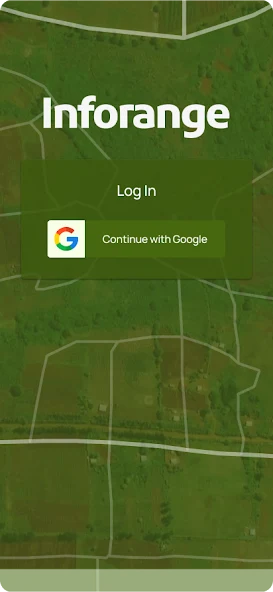
Sign in
-
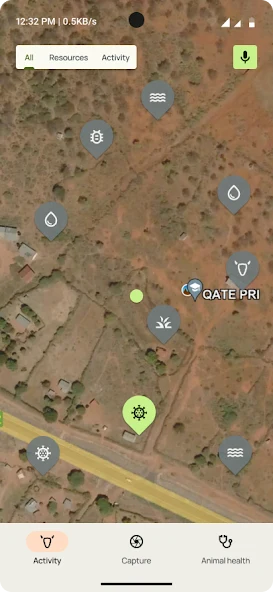
Resource map
-
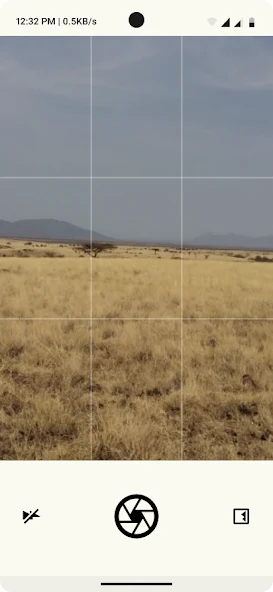
Field capture
-
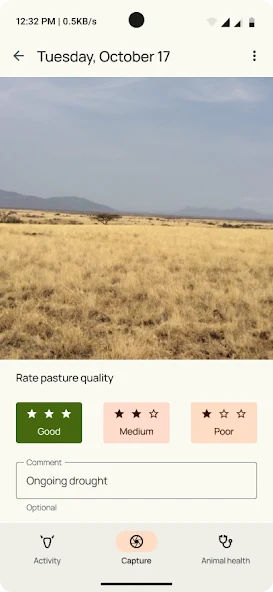
Pasture observation
The constraints shaped the architecture
| Constraint | Engineering response |
|---|---|
| No map connectivity | Bundled offline vector maps, online satellite imagery when connected |
| Limited battery / no grid power | In-memory GPS batching + connectivity-aligned uploads |
| Diverse languages & low literacy | Background-synced local-language audio, community icons |
| Data privacy in the field | Full database-level encryption with hardware-backed keys |
Architecture
Native Android in Kotlin and Jetpack Compose, following Clean Architecture + MVVM and now enforced by a multi-module Gradle structure so domains stay isolated and the codebase stays testable. The app did not start this way — it was a single monolithic module for most of its life, and getting it here was itself one of the more interesting engineering problems on the project:
:app— initialization, navigation graph, DI scopes, global state.:feature:*— one isolated module per product domain, each owning its own screens, state, and domain logic so features evolve without coupling.:core:*—model(pure Kotlin domain),data(data sources, local DB, network),workers(background execution),ui(shared Compose design tokens).
Offline-first foundation
Offline maps. MapLibre renders bundled vector map packages entirely on-device — zero network at map time — and layers in online satellite imagery whenever a connection is available. The large map assets ship via Play Asset Delivery as an install-time asset pack, and a first-launch worker stages them to internal storage.
Encrypted local cache. The Room database is encrypted at the storage layer. Encryption keys are generated on-device, hardware-backed, and never stored in plaintext — and a self-healing recovery path handles corrupted key material gracefully instead of hard-crashing.
Data flow: the local database is the single source of truth
The UI never reads the network directly. It observes Room through Kotlin Flows, and a cache-update strategy keeps the local database fresh in the background:
Simplified illustrative code. This example mirrors the documented cache-update pattern; it is an explanatory sketch, not a verbatim excerpt from the InfoRange codebase.
// Cache-Update-Strategy: show cached data instantly, reconcile in the background.fun observeMarkers(bounds: GeoBounds): Flow<List<Marker>> = flow { // 1. Emit whatever is already on-device — instant, works fully offline. emitAll(dao.getCachedMarkersInBoundsFlow(bounds))}.onStart { // 2. Fetch only the region in view, diff, and write back to Room. runCatching { api.fetchMarkers(bounds) } .onSuccess { remote -> dao.upsertAndPruneExpired(remote) } // 3. The Flow above pushes the merged result straight to the UI.}Loading only the records within the map viewport’s region
(getCachedMarkersInBoundsFlow) keeps navigation instant even with a large dataset,
while a targeted background sync merges server data for just that region.
Battery-aware location tracking
With no grid power to rely on, location tracking has to preserve battery without
sacrificing the detail of a useful track. InfoRange samples a coordinate every 30
seconds, holds the samples in an in-memory ArrayDeque, and persists each group of
10 points in one Room transaction—roughly one write every five minutes instead of
one write for every location update.
Simplified illustrative code. This sketch demonstrates the documented batching boundary; it is not a verbatim excerpt from the InfoRange codebase.
private val buffer = ArrayDeque<Coordinate>()private const val FLUSH_THRESHOLD = 10
fun onLocation(coordinate: Coordinate) {    buffer.addLast(coordinate)    if (buffer.size >= FLUSH_THRESHOLD) flush()}
private fun flush() {    if (buffer.isEmpty()) return    val batch = buffer.toList()    buffer.clear()    dao.insertAll(batch.map(Coordinate::toRow))}
override fun onCleared() {    flush()    super.onCleared()}
The two batch boundaries solve different problems. The in-memory batch reduces
the frequency of local database writes. Once persisted, coordinates remain in the
offline-first store until UploadCoordinatesWorker can send them. WorkManager
aligns that upload with available connectivity and keeps the work durable across
app restarts and device reboots.
This deliberately trades a small in-memory durability window for fewer database
writes. Flushing from onCleared() preserves the remaining points during an
orderly ViewModel teardown; it is not treated as protection against an abrupt
process death.
Sync & networking
A Ktor client over OkHttp, tuned for weak signal: generous timeouts, Gzip/Deflate compression, and client-side rate limiting. Durable work runs through WorkManager so it survives reboots — background jobs handle data sync, message delivery, location uploads, and asset caching.
To serve low-literacy Rendille and Borana users, localized intro audio is downloaded and cached in the background so the app can be navigated by ear, backed by community-designed category icons.
System context: the cloud counterpart
The backend is included here only to explain what the mobile app synchronizes against — it is not my work. The app’s canonical cloud counterpart is a geospatial REST API whose server-side proximity queries mirror the app’s bounded regional sync, with token-based auth and push messaging. The mobile app reconciles its offline-first local store against that system of record whenever a connection appears.
Stability as the user base widened
A field app is only as reliable as its worst device. As InfoRange moved beyond the initial pilot to a broader set of users — and a much broader set of handsets than anything we could test on directly — Firebase Crashlytics became the feedback loop that made that scale survivable. Automated crash and non-fatal reporting meant failures confined to particular devices and OS versions surfaced as clustered, reproducible reports rather than as second-hand accounts from a site hundreds of kilometres away with no connectivity.
That turned a class of bug that is notoriously hard to chase — one that never appears on the test bench and cannot be reproduced on demand — into ordinary triage work: identify the affected device class, reproduce against it, fix, and watch the cluster close out in the next release. Crash-free sessions climbed as the install base grew, which is the direction that matters.
Agentic delivery: making deferred work affordable
Every long-lived project accumulates a list of work everyone agrees is necessary and nobody can justify starting. InfoRange’s list was the usual one: the codebase was a single monolithic module, test coverage was thin in exactly the places that mattered, and a whole class of crashes lived only on handsets nobody on the team owned. None of it was mysterious. All of it was simply too expensive.
From early 2026 I ran the project’s late-stage work with Claude Code in the loop, and what changed was not how fast I typed — it was which items on that list became affordable at all.
The modularization. Breaking the monolith into the :app / :feature:* /
:core:* structure described above is the kind of migration that is easy to scope and
hard to survive: hundreds of files, every dependency edge a chance to leak a domain
into a layer that shouldn’t know about it. We had scoped it in months and shelved it
accordingly. Driven agentically — mechanical moves executed in bulk, boundaries
reviewed by hand — it landed in weeks.
Coverage first, then the migration. The migration was only safe to attempt because the tests went in ahead of it. Retrofitting coverage onto existing code is the archetypal deferred task — high value, zero glamour, never this sprint. Generating it against code whose behaviour was already pinned by production reality turned that from a project into a prerequisite, and gave the refactor something to fail against.
Crash triage. The Crashlytics loop described above surfaced clustered, reproducible reports; the bottleneck was the hours to work each one, on device classes I could not hold in my hand. Feeding a cluster’s stack traces and the surrounding code in and getting back candidate repro paths and fixes compressed the slowest part of that loop — the part where you sit and reason about a device you have never seen.
The same leverage carried into feature work, where implementations that would once have been scoped across a release cycle fit inside one. The judgement did not move: what ships to a field officer in Marsabit still gets reviewed line by line, because a mistake there is not a rollback, it is a lost day’s data with no way to report it. Agents made the expensive work cheap. They did not make it optional.
Outcome
InfoRange proves that a modern Android stack — Compose, Clean Architecture, encrypted Room storage, Ktor, WorkManager — can deliver a genuinely reliable experience in one of the hardest deployment environments there is. Load times improved ~25% over the legacy baseline, and the offline-first design means the app is fully usable with no signal at all.